Seting Blogspot dengan domain sendiri .com biasanya lancar kali ini ada masalah error saat diakses lewat browser. Sebagai gambaran informasi, sebelumnya domain ini hosting di Cpanel dan berjalan normal. DNS management menggunakan Cloudflare. Error pertama saat menambahkan Custom Domain belum bisa terverifikasi, namun setelah menunggu dan mematikan Cloud DNS di clouldflare domain bisa terhubung.

Berikut record DNS secara lengkap berupa CNAME dan A DNS yang ditambahkan jika hosting domain menggunakan Google (Blogspot/Blogger).

Error Blogspot berikutnya (SSL Error)
error Web seperti ini : Error Blogspot pada (SSL Error).
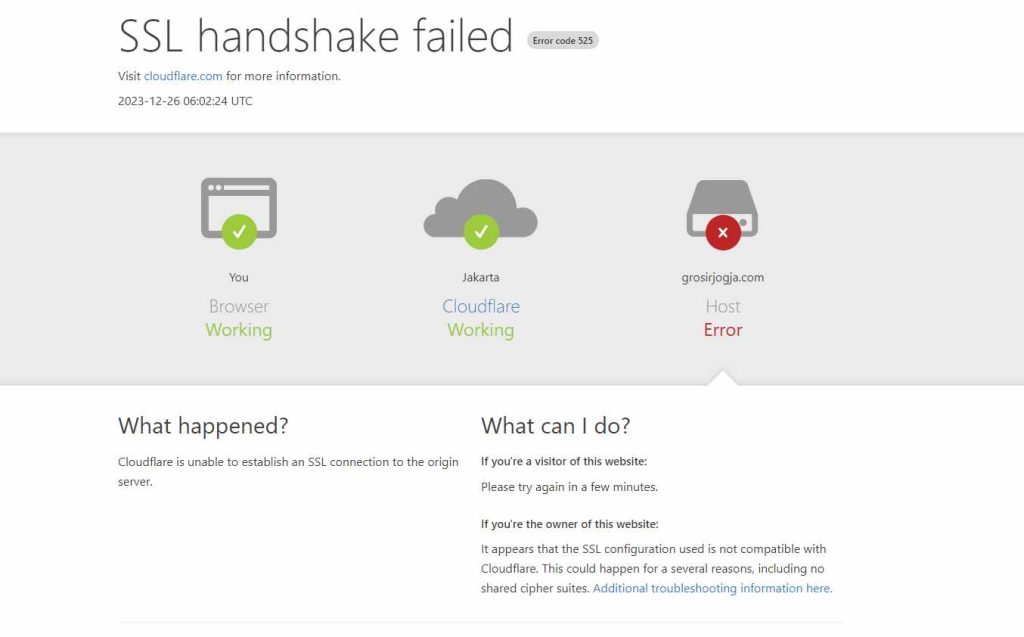
SSL handshake failed Error code 525, Visit cloudflare.com for more information. 2023-12-26 06:00:05 UTC. You
Browser, Working, Jakarta, Cloudflare, Working www.grosirjogja.com Host Error What happened? Cloudflare is unable to establish an SSL connection to the origin server.
What can I do? If you’re a visitor of this website: Please try again in a few minutes. If you’re the owner of this website: It appears that the SSL configuration used is not compatible with Cloudflare. This could happen for a several reasons, including no shared cipher suites. Additional troubleshooting information here.
Cloudflare Ray ID: 83b719fb9816*** • Your IP: Click to reveal • Performance & security by Cloudflare
Check Blogspot Account /Dashboard Blogspot
HTTPS :
HTTPS availability, Status: Failed – HTTPS SSL Certificate failed to be processed due to challenge data not being visible through the public internet. Check your DNS setup. The operation will retry shortly. HTTPS redirect, This setting is unavailable unless HTTPS is available.
Baca juga : Cara Hapus Blog di Blogspot – Blogger
Kita coba matikan layanan Cloud DNS-nya (proxy) di Clouldflare dulu pada A dan CNAME domain yang digunakan.

Saat dicek HTTPS availability di Blogspot : Status: Pending – HTTPS Availability is being processed. Check back later.

Kita tunggu sampai status HTTPS berubah jadi aktif seperti ini. HTTPS, HTTPS availability : Status: Available

Selanjutnya kita bisa coba akses alamat webnya kembali, semoga berhasil.