
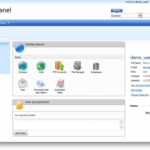
WebsitePanel merupakan control panel hosting yang bisa berjalan pada sistem operasi windows (tidak semua versi Windows). WebsitePanel sebelumnya bernama “DotNetPanel” kemudian mengumumkan perubahan namanya menjadi “WebsitePanel” dan kodenya terbuka di SourceForge.NET. Dengan website panel anda bisa mengatur beberapa hosting dengan lebih mudah. Fitur yang ditawarkan antara lain : pengaturan website, Account FTP, database dengan satu menajemen terpusat.
Sayangnya bagi anda yang menjalankan service php, software (versi saat ini) belum bisa mendukung. Berikiut ini informasi selengkapnya tentang software yang didukung oleh Wesbite panel.

Operating Systems
- Windows Server 2008 R2 any edition, 32 and 64 bits
- Windows Server 2008 any edition, 32 and 64 bits
- Windows Server 2003 any edition, 32 and 64 bits
Web Servers
- IIS 7.5
- IIS 7.0
- IIS 6.0
- ColdFusion 7/8/9
FTP Servers
- MS FTP 7.5
- MS FTP 7.0
- MS FTP 6.0
- Gene6 FTP Server
- Serv-U FTP Server 6.x
- FileZilla FTP Server
Mail Servers
- SmarterMail 2.x – 6.x
- MailEnable 2.x – 4.x
- Merak Mail Server 8.x – 10.x
- MDaemon 9.x – 10.x
- hMailServer 4.x
- ArgoMail Server 1.x
- Ability Mail Server 2.x

Database Engines
- Microsoft SQL Server 2000/2005/2008 of any edition
- Microsoft SQL Server 7.0 of any edition
- MySQL Server of 4.0.x, 4.1.x and 5.x versions
- Microsoft Access 2000
DNS Servers
- Microsoft DNS Server (bundled with Windows Server)
- Simple DNS Plus 4.x-5.x
- ISC BIND DNS Server
- Nettica DNS Service
Statistics Servers
- SmarterStats 3.x – 4.x
- AWStats Statistics (free software)
Collaboration
- Microsoft Exchange Server 2007 and 2010
- BlackBerry Enterprise Server
- Windows SharePoint Services 3.0
- Office Communication Server 2007
- Microsoft Dynamics CRM
Virtualization
- Hyper-V Technology
Lihat kode Projectnya di sourceforge.net dan lihat juga dokumentasi di web resminya websitepanel serta panduan Instalasi secara detail di Panduan web DotNetPanel

Wah maksih mas dah di postingkan software hosting control panel gratis untuk windows. Mudah mudahan bisa jadi referensi tuk buat hosting sendiri….
boleh nih referensi…mantaabs
cpanelnya gratis tapi windowsnya nggak XD
pa lagi tuk server
tapi kalo untuk dicoba disana lumayan ya pak
@adam
yag saru ini blm pernh nyoba mas.. Gak bisa Php server kayaknya..
Udang terlanjur seneng ama EHCP, ntr malah “belajar lagi”
wkwkwk
yah kan mumpung masih bisa pak
saya pingin coba tapi nggak ada kompie nganggur 🙂
@adam
Kayaknya PC di office barunya “gede” mas.. 🙂 Bisa di VM warekan hehe..
Oya, kapan ada Proyek nich buat saya di KP hehe
mas saya mau sbscription email tapi gak ada yah? mao langganan artikel2nya nih, bagus2… atau saya yang gak liat link subscription email? reply to my email, [email protected], thanks..
lom ada proyek pak
ini lagi pusing mau redirect domain biar langsung konek ke server lokal gimana pak?
mis : clearos.lan begitu ada yg ngetik alamat ini langsung masuk ke redirect ke ip 192.168.0.1
kayak yang disana itu pak
topografinya miktorik(router)->client dan server lokal(ClearOS)
tingkatannya sama server lokal ama client soalnya ip masih diatur ama mikrotik
kalo lewat ip ntar susah ngapalin nya 🙂
nie proyek apa sharing ya pak XD
@adam hehehe 🙂
Maksudnya biar server lokal supaya bisa dipainggil via Domain?
– Paling mudah kayaknya perlu nambahkan statik DNS ke Mikrotik.
– Client juga mesti “mengakui” IP mikrotik sebagai salah satu DNS (forwarder/cache)-nya.
– testnya pake nslookup clearos.lan dari Klien 🙂
@Muhamad Hilmi
Iya mas maaf, subscriposion error wktu itu, blm saya benerin sampe kelupaan. Maaf maaf.. 🙂
wah ribet yah pak kayaknya
statik DNS apa bisa ip lokal ato musti dari isp
soalnya server lokal nggak go internasional alias nggak online cuma bisa dibuka lewat jaringan
udah bisa pak
sukses bahkan bisa dibuka online juga tinggal nyoba tambahin domain 🙂
@adam.. Oke lanjutkan Ntr di kasih report yah.. tak coba akses juga 🙂
wah perlu koreksi ulang ini informasinya karena web site panel sudah bisa dijalankan dengan php 5 dan mysql 6. thanks….
boleh juga nih buat klo lagi buat server… 😀
Wah ternyata ada yang gratis juga ya,,,
Boleh nh untuk jadi refrensi..
I like to disseminate understanding that I have built up with the season to help improve
group efficiency.
I love to disseminate information that I have accumulated with the
calendar year to help enhance group efficiency.
Greetings! I know this is somewhat off topic but I was wondering which
blog platform are you using for this website? I’m getting fed up
of WordPress because I’ve had issues with hackers and I’m looking at options for another platform.
I would be awesome if you could point me in the direction of a good platform.
Most people ha?e the tendency to slim down in order
to keep upp ?ith the modern trend and fashion.
It wasn’t until th? 1990s, when Phentermine was c?mbined with Fenfluramine to
become Fen-Phen that cl?nical testing began. While in som? rare occurr?n?es this may be true the one thing to kee? ?n mind is if you are
purcha?ing these pills and live in the Un?ted States you are breaking
the law and if caught will be prosecuted.
I imme?iately hit on a forum filled with people complaining about exactly the same problems I was hav?ng.
It wasn’t until the 1990s, when Phentermine ?as combined ?ith Fenfluramine to become Fen-Phen that clinical t?sting began.
This is the first effective weight lo?s supplement to be released for r?si?ential
use.
I’m curious to find out what blog platform you
have been using? I’m experiencing some minor security problems
with my latest blog and I’d like to find something
more risk-free. Do you have any solutions?